Contributing Guide
Thank you for participating
The following is a set of rules for contributing to Rucio and its packages. Use your best judgment, and feel free to propose changes to this document.
If you have questions, you can reach the core development team on our Mattermost channel.
What should I know before I get started
A contribution can be either a patch or a feature:
- Patches include bugfixes and minor changes to the code and are included in patches that are usually released every two weeks.
- Features include major developments or potentially disruptive changes and are included in feature releases made multiple times a year.
The repository consists of different branches:
- the master branch includes the development for the next major version.
- the release-… branches include the patch/minor development of the releases.
Release branches only exist for the currently maintained release versions.
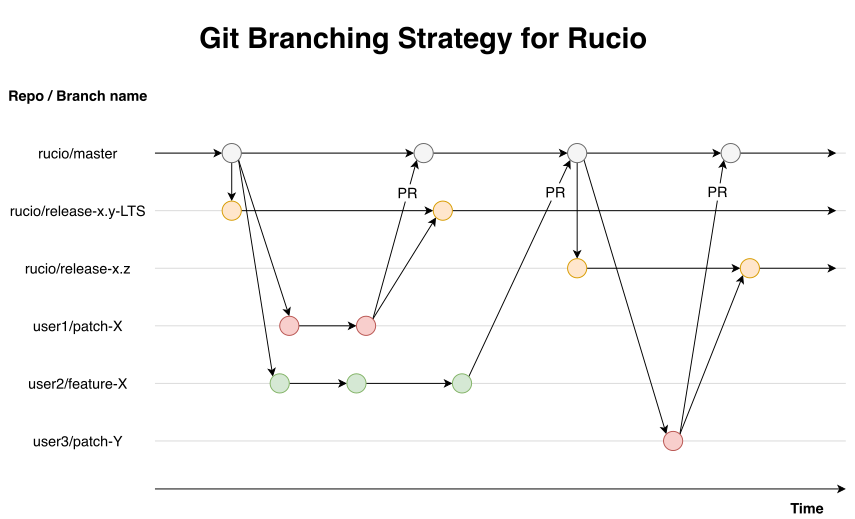
Generally all pull requests are to be created against the Rucio master branch. Features will end up in the upstream master only and patches are cherry-picked to the maintained releases if applicable. Release-specific changes are excluded from that rule and might be needed if e.g. cherry-picking to the last release was not successful.
The following figure might help you with an overview:
You are expected to read, and follow, the Rucio AI Policy when contributing (Creating code, documentation, etc.) to the project.
How can I Contribute
1. Prerequisite
-
Ensure you add your name (and organisation) to our list of contributors.
-
Fork the repository on Github.
-
Clone the repository to your development machine and configure it:
git clone https://github.com/<YOUR_USER>/rucio/cd ruciogit remote add upstream https://github.com/rucio/rucio.git -
Optional: Install Git Hooks
The
pre-commitpython package is configured for this repository. Thepre-commithook checks the syntax and format of the files before committing. This saves time in the development process, since minor errors are noticed before submission.To install the package and activate the hooks for the project:
pip install pre-commitpre-commit installTo enable full local checks, install instead
commit-msgandpre-pushhook types too:pre-commit install --hook-type pre-commit --hook-type commit-msg --hook-type pre-pushMore information please view the pre-commit documentation
2. Create an Issue
Please ensure that an issue exists before submitting your contribution as a pull request. The issue should contain the motivation, modification and expected results (discussions usually happen there). No pull request will be merged without an associated issue (release notes are generated from issues). Each issue gets a unique issue number.
3. Commit your changes
Create a local branch that corresponds to the issue, then commit your changes using the Conventional Commits format. All commits must follow the format described in the Conventional Commits section below and include proper git trailers for issue tracking.
Basic commit format:
git commit -m "<type>(<scope>): <description>" --trailer "Closes: #<issue_number>"
Example:
git commit -m "feat(Transfers): Group bulk transfers by authentication method" --trailer "Closes: #8199"
Add additional explanations to the body of the commit, such as motivation for certain decisions and background information. Here are some general rules..
Using multiple commits is encouraged as long as they achieve an independent, well-defined, change and are well-described. Otherwise multiple commits should be squashed.
Conventional Commits
Rucio enforces the Conventional Commits specification to ensure consistent and meaningful commit messages across the project. This is enforced through commitlint during CI checks and can be enabled locally via pre-commit hooks.
Commit Message Format:
<type>(<scope>): <description>

[optional body]

[footer(s)]
Rules:
-
Type: Must be one of the following allowed types:
Type Category Description featFunctional Introduces a new feature or capability (including changes resulting from removing a functionality) fixFunctional Corrects a bug or unexpected behavior docsNon-functional Updates documentation or code comments styleNon-functional Formatting, whitespace, or cosmetic changes refactorNon-functional Restructures code without changing its behavior testNon-functional Adds, updates, or fixes tests ciNon-functional Modifies CI/CD pipelines or scripts revertNon-functional Undoes a previous commit
Quick guide: How to choose the right type
Ask yourself these questions in order:
- Are you adding a new feature or capability that didn't exist before? →
feat - Are you fixing broken or incorrect behavior? →
fix - Are you only updating documentation (README, docstrings, comments)? →
docs - Are you making cosmetic changes like formatting, whitespace, or linting fixes? →
style - Are you reorganizing or cleaning up code without changing what it does? →
refactor - Are you adding, updating, or fixing tests? →
test - Are you modifying CI/CD pipelines, workflows, or build scripts? →
ci - Are you reverting a previous commit? →
revert
Tip: If none of these fit, consider splitting your commit into smaller, focused changes.
-
Scope: Must be one of the predefined Rucio components (PascalCase). The available scopes are:
Auth: Authentication & AuthorisationClients: Client libraries and toolsConsistency: Consistency checksCore: Core & InternalsDatabase: Database-related changesDatasetDeletion: Dataset deletion functionalityDeletion: File deletion functionalityDIRAC: DIRAC integrationContainerization: Docker, Kubernetes, and container-related functionalityDocumentation: Documentation updatesLifetimeModel: Life time model processingMessaging: Messaging systemMetadata: Metadata workflowsMonitoring: Monitoring, observability, and tracesMultiVO: Multi-VO functionalityOpenData: Open data functionalityPolicies: Policy managementProbes: Probes & AlarmsProtocols: Upload, Download, Deletion protocolsRebalancing: Data rebalancingRecovery: Data recoveryReplicas: Replica workflowsAPI: REST & APIRules: Replication rules and rule daemonsSubscriptions: Subscription daemonTesting: Regression tests, Unit tests, and CITransfers: Transfer daemonsWebUI: Web user interface
Note: Any changes to this list should also be applied to the GitHub labels and the commitlint config
-
Description:
- Should not end with a period
- Should be concise but descriptive
- Use imperative mood ("add feature" not "added feature")
-
Line Length: Header must not exceed 100 characters to prevent truncation in GitHub UI
Examples:
feat(Transfers): Group bulk transfers by authentication method
fix(Core): Fix exception when attaching nonexistent DID to container
docs(Documentation): Update API endpoint descriptions
style(Transfers): Touch up comments
refactor(Transfers): Simplify group key construction
Choosing the Right Type:
Sometimes it's unclear which type to use. Consider the intent and impact of your change:
| Ambiguity | Choose | When |
|---|---|---|
style vs refactor | style | Formatting, whitespace, comment tweaks |
style vs refactor | refactor | Modernizing syntax, restructuring code |
fix vs refactor | fix | Correcting incorrect behavior |
fix vs refactor | refactor | Improving code without fixing a bug |
docs vs style | docs | Updating documentation files or docstrings |
docs vs style | style | Minor comment formatting within code |
test vs fix | fix | Fixing flaky test due to race condition |
test vs fix | test | Adding new test cases or correcting test logic |
Examples:
| Scenario | Preferred | Rationale |
|---|---|---|
Replacing Union[X, None] with Optional[X] across 60+ files | refactor(Core): Remove deprecated constructs from the typing module | Modernizes codebase to newer Python conventions |
| Adding type hints to function signatures | refactor(Core): Add type hints to transfer functions | Improves code without changing behavior |
| Fixing a test that fails intermittently due to timing | fix(Testing): Resolve judge evaluator test flakiness | Corrects broken behavior in test suite |
| Adding new test cases for edge cases | test(Testing): Add tests for attaching nonexistent DIDs | Extends test coverage |
| Updating README with new installation steps | docs(Documentation): Update installation instructions | Documentation-only change |
| Fixing typos in code comments | style(Core): Fix typos in transfer module comments | Minor stylistic improvement |
Breaking Changes
Commits that introduce breaking API or behavioral changes must use ! after the type/scope in the header and include a corresponding BREAKING CHANGE footer.
Format:
<type>(<scope>)!: <description>

[optional body]

BREAKING CHANGE: <description of the breaking change and its impact>
Requirement: A breaking change commit must include both the ! marker in the header (e.g., feat(Core)!: ...) and a BREAKING CHANGE footer with a description explaining the impact.
Example:
refactor(Core)!: Make session a mandatory keyword-only argument

BREAKING CHANGE: The session argument is now mandatory and keyword-only
for all core functions. Callers must explicitly pass session=<session>
instead of relying on positional arguments or default values.
Closes: #5947
Git Trailers
All commits must reference a GitHub issue using git trailers. This ensures proper traceability and automatic issue closure.
Note: Do not add empty lines between trailers; trailers must be a contiguous block at the end of the commit message.
Tip: Avoid adding Closes: to every commit in a PR. Use Issue: for intermediate commits, and reserve Closes: for the commit you intend to close the issue.
Supported Trailers:
Closes: #<issue_number>- Automatically closes the issue when PR is mergedIssue: #<issue_number>- References an issue without closing it
Adding Git Trailers:
Method 1: Using git commit command
git commit -m "feat(Transfers): Group bulk transfers by authentication method" --trailer "Closes: #8199"
Method 2: Adding to commit body
git commit -m "feat(Transfers): Group bulk transfers by authentication method

The authentication method is a property of the FTS job. If Rucio does
not partition the transfers based on it, then some may be done with an
incorrect authentication method.

Closes: #8199"
Complete Example:
feat(Transfers): Group bulk transfers by authentication method

The authentication method is a property of the FTS job. If Rucio does
not partition the transfers based on it, then some may be done with an
incorrect authentication method.

Closes: #8199
See the original PR #8202 for reference.
4. Push changes and create a Pull Request
Push the commit to your forked repository and create the pull request. A template will guide you through the creation process, please fill out all required information. Try to keep the Pull Request simple, it should achieve the single objective described in the issue. Multiple enhancements/fixes should be split into multiple Pull Requests.
While using the github interface is the default interface to create pull requests, you could also use GitHub’s command-line wrapper hub or the GitHub CLI.
The format of the pull request title must be:
<component>: <short_change_message> #<issue number>
5. Watch the Pull Request for reviews
Watch the pull request for comments and reviews. We expect that all continuous integration test-cases run through, if they do not either close the pull request and re-submit at a later time or fix them right away. Stale pull requests will be closed automatically.
For any pull requests update, please try to squash/amend your commits to avoid “in-between” commits.
Automatic Testing
Every submitted pull request will automatically be run through automated testing through continuous integration. This testing includes multiple suites of testing, all of which are required to pass. Please enable testing on your fork of the main repository to see the status of your tests as you develop.
Writing Tests
For every feature added, there should be a set of corresponding tests that verify its functionality and integration with the rest of the codebase.
- Use fixtures (found in the tests/conftest.py) or temporary object factories (tests/temp_factories.py) instead of making bare instances of rucio objects.
- Only write tests deterministically. Randomness produces flaky tests.
- Only write tests that are "stand alone" - tests should be entirely self-contained besides for the before-mentioned fixtures and factories.
- If a test requires a configuration file changed, use a fixture to modify a mock-configuration file.
- If a test can interfere with another test
(use the same database table, interact with a queue), mark it as
noparallel. - If a test is specific to a VO, mark it as such using a
skip_non_{vo}fixture, or mark it asskip_multivoif the test only is intended to work in single-vo settings.
Human Review
Anyone is welcome to review merge requests and make comments!
The Rucio development team can approve, request changes, or close pull requests. Merging of approved pull requests is done, after a second review, by the Rucio merge team.
Coding Style
We use flake8 and pylint to sanitize our code. Please do the same before submitting a pull request.
A more indepth set of coding style guidelines can be found here.